
01 / PERFORMANCE
Hands on.
Two decks.
Mix with jog wheels, hot cues, loops, effects and a full mixer. Use SYNC and quantize when you need them.
Explore the decks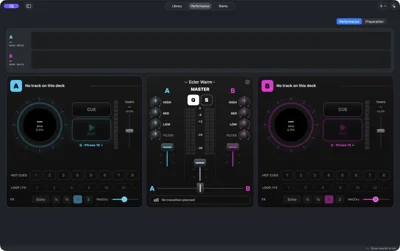
DJ PERFORMANCE / APPLE SILICON
Two decks. A Director that plans the transitions. A native DJ app for Mac and iPad, built to keep you in the mix.
A/B TEKNIQ / VISUAL IDENTITY · VISUALS COMING SOON
For Mac and iPad. Apple silicon.
macOS 26+ ·
iPadOS 26+ · Mac and iPad launch together
Read your music. Find the right moment.
Make the mix your own.
01 / PERFORMANCE
Mix with jog wheels, hot cues, loops, effects and a full mixer. Use SYNC and quantize when you need them.
Explore the decks 02 / TRANSITION INTELLIGENCE
The Director finds the phrase, plans the blend and explains the bass swap. Audition it, change it, rate it.
Meet the Director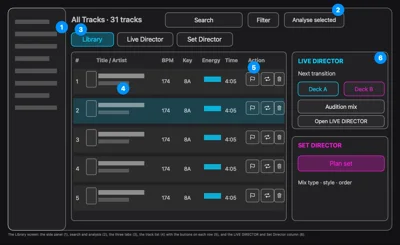
The Library places source folders, playlists and Sets in the sidebar, with tracks in the central list. Track information includes analysis results such as tempo and key. Select music and run Analyse before loading the decks or preparing a transition. Organising the library does not change the original audio files.
03 / REACTIVE VISUALS
Music-reactive visual layers and vertical video export are in development. A new dimension for your sets.
Watch the coming-soon demo
THE PERFORMANCE WORKSPACE
Deck A in cyan. Deck B in magenta. Your mixer in the middle. Keep the controls you need in view, then open the Library or Director when it’s time to plan.
Take a closer lookApp screenshots and illustrated explanations. No autoplaying audio.
The Library places source folders, playlists and Sets in the sidebar, with tracks in the central list. Track information includes analysis results such as tempo and key. Select music and run Analyse before loading the decks or preparing a transition. Organising the library does not change the original audio files.
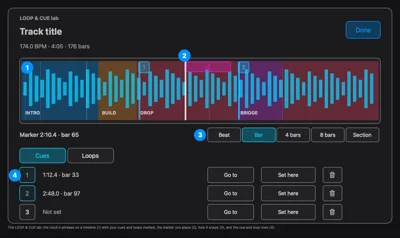
The cue-and-loop workspace shows the track as a waveform timeline with section boundaries, cue markers and loop ranges. Selecting a point or range lets you inspect and adjust its timing. The written instructions explain how to set or audition cues and loops; the diagram does not replace those instructions.
Free sample / promo tracks provided by SYSTEM 174.
See tempo, beats, key, loudness and sections. Know where the build ends and the drop begins.
Plan around a phrase—a group of bars—so timing means more than a matching number.
Read the plan in plain English. Audition, edit or reject it. The final decision is yours.
After enough ratings, preferences help choose between equally safe plans. Learning stays on your device.
Ten simple steps to get you behind the decks.
READY FOR YOUR NEXT SET?
macOS 26 or later · Apple silicon · Intel Macs are not supported.
Check download availability