Each deck plays one track. The mixer has an equaliser (bass, mid, high), a filter, a volume fader for each deck, a crossfader, and meters.
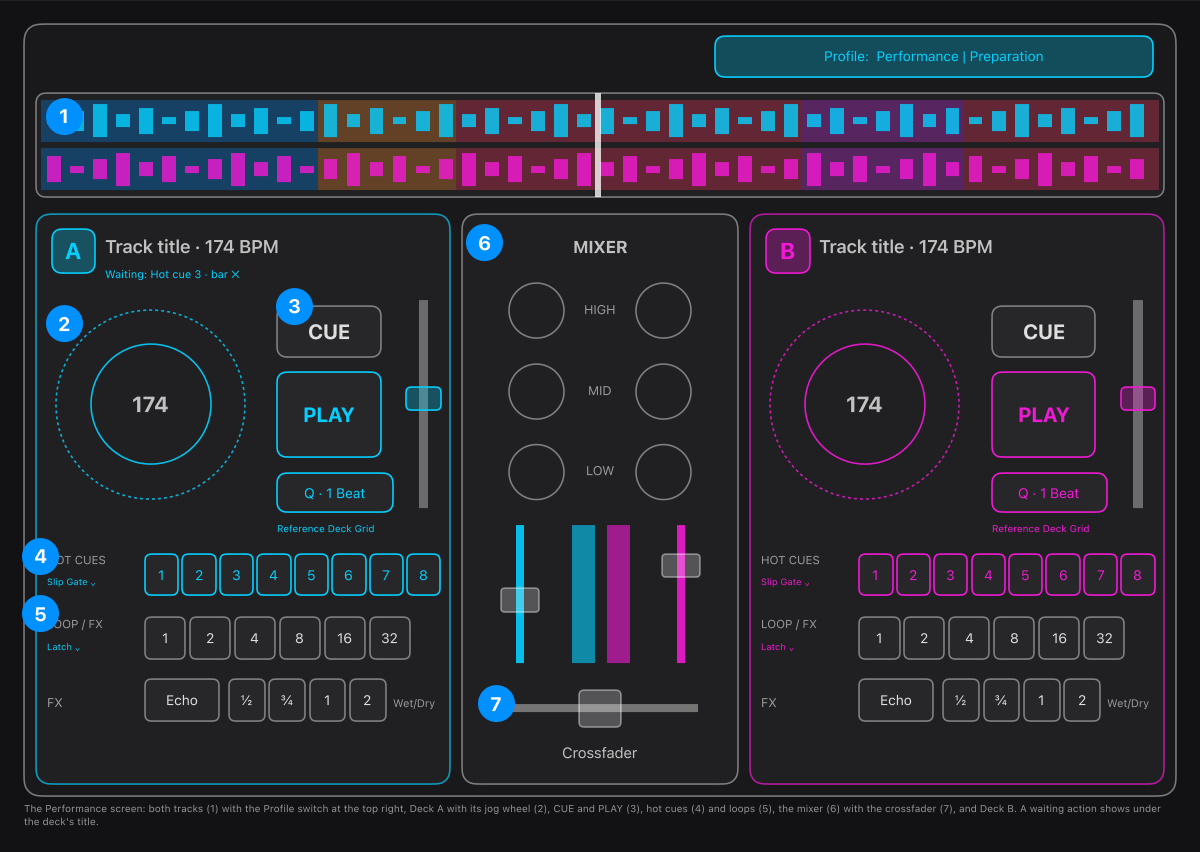
- The overview: both tracks around the playhead, with the phrases (intro, build, drop, bridge, outro) tinted over the waveform. A quantized action waiting for its beat is marked there where it will fire. The Profile switch at the top right chooses what a hot cue does on a stopped deck.
- The jog wheel: the outer edge nudges the track a beat, the middle scrubs it.
- CUE and PLAY, with the quantize grid menu (Q · 1 Beat) under them.
- Eight hot cues: press one to jump to it. An empty one sets itself where the deck is.
- Loops of 1 to 32 bars, with the effects you set held on the same button. The three dots hold beat loops, beat jump and phrase loops.
- The mixer: equaliser and filter for each deck, the volume faders and the meters.
- The crossfader moves the sound between the decks.
The Profile switch above the decks decides what a hot cue does on a stopped deck: Performance starts it, Preparation jumps and waits for Play or Cue play.
To mix by hand:
- Load a track on each deck.
- Press play on one deck.
- Bring in the other with its volume fader or the crossfader, and use the equaliser to make room for it.
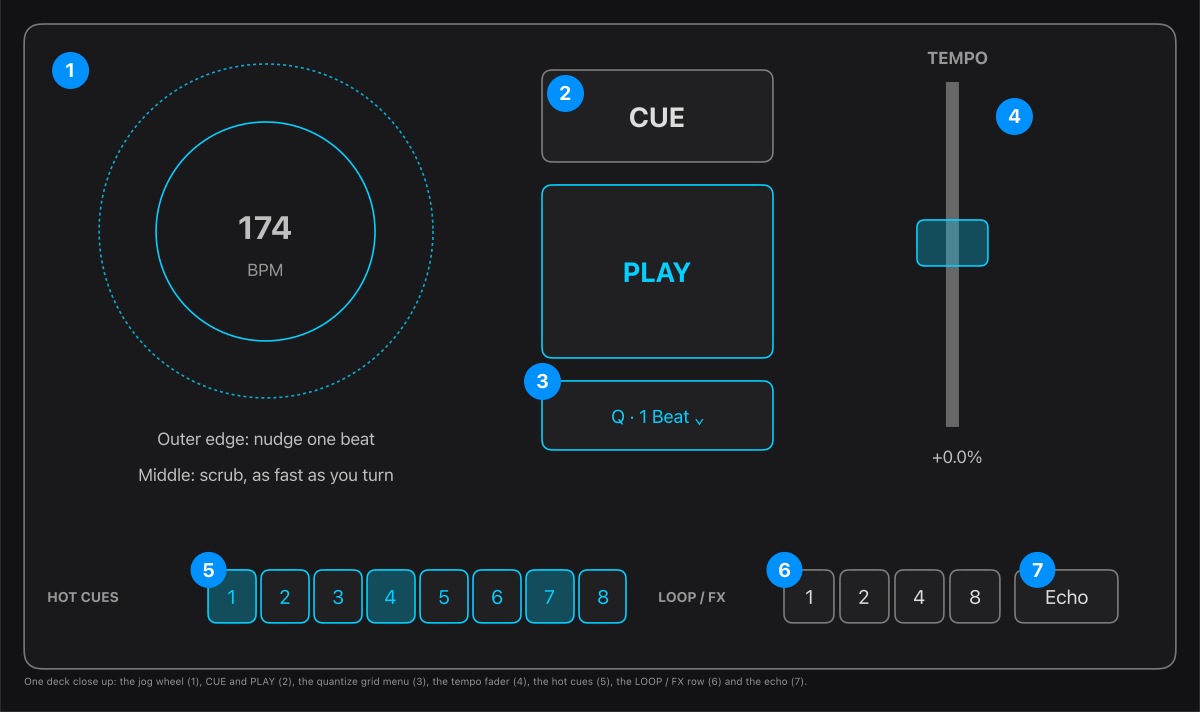
One deck close up:
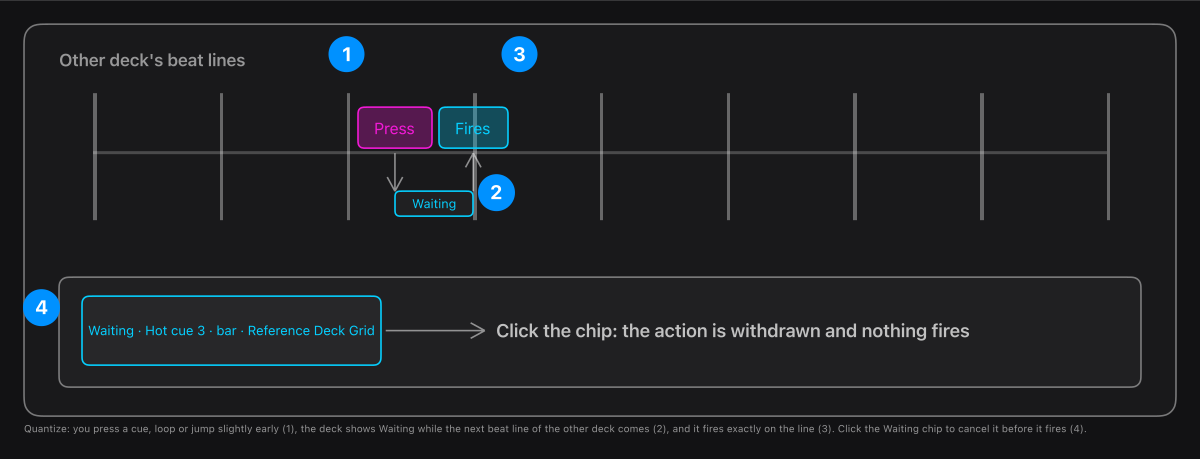
What the quantize button does when you press something:
- The jog wheel: outer edge nudges one beat, the middle scrubs as fast or slow as you turn it.
- CUE and PLAY. CUE owns the deck's one cue point: stopped with none it sets one here, stopped with one it plays from it while held and returns on release, playing it goes back to it. Right-click CUE to set or clear the point or turn on Quantized CUE return; right-click PLAY for Cue play (start from the cue point).
- Q · grid menu: picks the quantize grid for this deck (beat, bar or a phrase). Quantize itself is switched on and off for both decks by the Q button on the mixer, or the Q key; the S button (or S key) is SYNC: Deck B follows Deck A's tempo and beat, and pressing it again releases it. Both decks must be playing analysed tracks.
- With quantize lit, cues, loops, jumps and PLAY are lined up to the beat (or bar, or phrase) of the other deck, so they stay in time.
- The tempo fader: plus or minus 16 percent. Double-click the handle to reset it.
- Hot cues 1 to 8: light only while held, outlined the rest of the time. The HOT CUES label is a menu: Hot cue jumps for good, Slip Gate plays the cue only while held and then rejoins where the track would have got to, Gate returns to where you pressed. A pad marked with a yellow triangle has a cue set on an earlier beat grid: its place is kept, and Edit cue offers to update its beat. A jump that is waiting for its beat shows under the deck's title; click it to cancel. Right-click a pad to edit its name, colour, own pad action and cue loop, or to clear it (Undo clear cue brings it back); the same menu switches between pads 1 to 8 and 9 to 16.
- LOOP / FX: press a loop button to loop, press it again to end the loop (its label is a menu: Roll makes a loop only while held, then rejoins the track). The three dots hold Beat jump (1 to 32 beats, forward or back) and Manual loop (Loop IN, Loop OUT, Reloop, and saving the loop with the track). Adjust the equaliser, filter or echo before you press it and they are kept on that button.
- Echo and its Wet/Dry control. It lights when you turn it on, and shows a wand when LIVE DIRECTOR is using it for a mix.
In the app: Open Performance